Modern software development is no longer just about sitting in front of a code editor and writing every line by hand. Developers now have access to AI tools that can explain code, suggest fixes, generate functions, review changes, and even work on tasks independently.
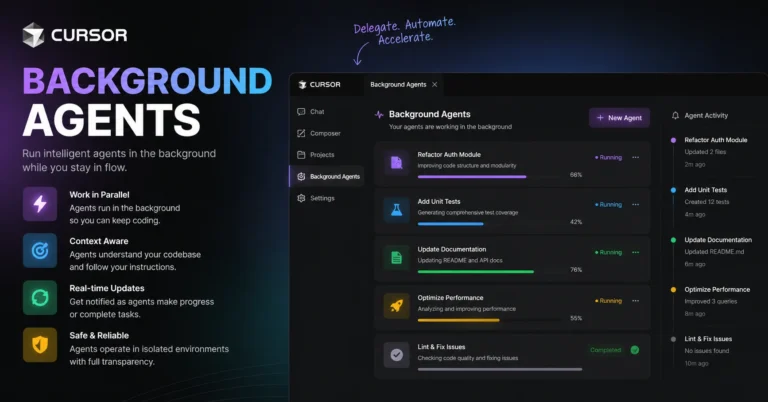
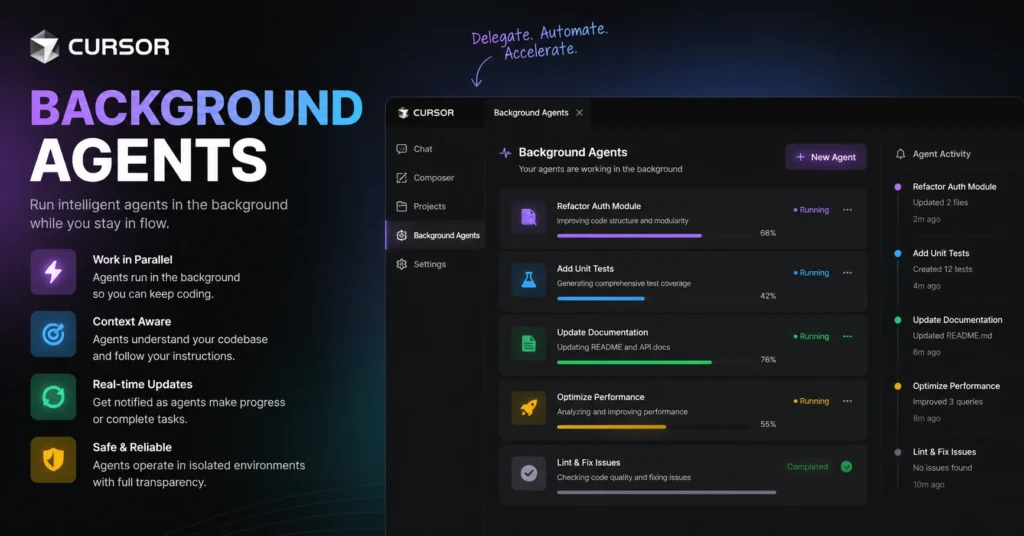
One of the more interesting developments in this space is Cursor Background Agents. Instead of requiring a developer to stay focused on an AI coding task while it runs, background agents are designed to work on coding tasks independently, allowing developers to continue with other work.
That simple idea can change the way developers approach repetitive programming jobs, bug fixes, refactoring, testing, and feature development.
Imagine assigning an AI agent a well-defined coding task before stepping away from your computer. While you work on another feature, the agent can inspect the project, make changes, run relevant commands, and prepare its work for review. The developer remains in control, but much of the repetitive execution happens in the background.
This article explains what Cursor Background Agents are, how they work, where they can be useful, their advantages and limitations, and how developers can get better results from them.
ALSO READ: RAG Models Scalability Latency Memory Usage: A Simple Guide
What Are Cursor Background Agents?
Cursor Background Agents are AI-powered development agents designed to work on coding tasks without requiring the developer to continuously interact with the coding assistant.
Traditional AI coding assistance is usually interactive. You ask a question, request a code change, review the response, and then continue the conversation. This approach is useful, but it can become time-consuming when a task requires multiple steps.
A background agent takes a more autonomous approach.
Instead of asking AI to generate one function, for example, you can give it a broader assignment such as investigating a bug, updating a component, improving a test suite, or implementing a specific feature. The agent can then work through the task while you focus elsewhere.
The important distinction is that the developer does not simply hand over an entire project and hope for the best. Good background-agent workflows involve clear instructions, defined objectives, appropriate project context, and human review.
The goal is not to eliminate developers. It is to reduce the amount of time they spend on repetitive implementation work.
How Cursor Background Agents Change The Coding Workflow
The traditional development process often looks something like this:
Identify a task.
Open the relevant files.
Understand the existing code.
Make changes.
Run tests.
Fix errors.
Review the changes.
Commit the work.
Every step can require attention.
AI assistants already make several of these steps faster, but Cursor Background Agents introduce another possibility: some of the workflow can happen independently.
For example, a developer might have a main task involving a new application feature. At the same time, there may be smaller tasks that need attention:
- Updating outdated tests
- Refactoring repetitive code
- Fixing a straightforward bug
- Improving error handling
- Adding documentation
- Investigating a failing test
- Updating configuration
- Cleaning up unused code
Instead of switching attention between all these jobs, the developer can delegate appropriate tasks to Cursor Background Agents.
This creates a workflow where the developer becomes more of an orchestrator and reviewer rather than manually performing every repetitive action.
Why Background Coding Agents Matter
The biggest benefit of Cursor Background Agents is not simply that they can generate code.
The real advantage is parallelization.
A developer normally has limited attention. Even if several tasks are waiting, only one task can receive full focus at a time.
AI agents can potentially work on multiple well-defined tasks while the developer handles something else.
For example, imagine a developer working on a web application. They might be building a new dashboard while several unrelated issues are waiting in the backlog.
One Cursor Background Agents could investigate a failing unit test.
Another could update a group of repetitive components.
A third could prepare documentation changes.
The developer can then review completed work rather than spending the entire day manually moving between small tasks.
This does not mean every task should be delegated. Complex architectural decisions, security-sensitive changes, and ambiguous requirements still benefit heavily from experienced human judgment.
How Cursor Background Agents Typically Work
The exact workflow can vary depending on the development environment and the agent configuration, but the basic concept is straightforward.
Give the Agent a Clear Task
The process begins with an instruction.
The quality of this instruction matters enormously.
A vague request such as:
“Improve the application.”
does not give an agent enough direction.
A better request describes the problem, expected result, relevant constraints, and validation requirements.
For example:
“Investigate why the user profile form fails when the email field is empty. Identify the cause, implement appropriate validation, update the relevant tests, and verify that existing valid submissions still work.”
This gives the agent a specific objective and a way to determine whether the work is complete.
The Agent Examines the Codebase
An effective coding agent needs to understand the surrounding project rather than blindly editing one file.
It may inspect relevant source files, configuration, dependencies, tests, and project structure.
This context allows the agent to make changes that fit the existing code rather than creating isolated code that does not match the application’s architecture.
The Agent Makes Changes
Once it understands the task, the agent can modify the appropriate files.
Depending on the assignment, that could involve creating new files, changing existing functions, updating tests, or modifying configuration.
This is where background execution becomes valuable because the developer does not necessarily need to remain involved in every individual edit.
Commands and Tests Can Be Used
Coding rarely ends when the first code change is made.
A good implementation needs validation.
Agents can work with project commands and testing workflows when those capabilities are available to them. Running tests or other checks helps identify mistakes before the work reaches human review.
The Developer Reviews the Result
Human review remains essential.
Even if the agent reports that a task is complete, developers should inspect the changes, understand what was modified, and verify that the implementation actually meets the requirements.
This is especially important for production applications.
The ideal relationship is therefore not “AI replaces developer.”
It is:
AI performs more of the mechanical work, while the developer provides direction, judgment, and final approval.
What Types Of Coding Tasks Are Best For Background Agents?
Not every programming task is equally suitable for autonomous execution.
Background agents are generally more useful when the task has a clear objective and measurable outcome.
Bug Investigation
A clearly described bug can be a good candidate.
For example, if a test fails whenever a particular input is provided, an agent may be able to inspect the relevant code, identify the cause, make a correction, and update the test.
The clearer the reproduction steps are, the better.
Refactoring
Refactoring can involve repetitive changes across multiple files.
For example, a project may contain several similar functions that should follow a consistent pattern. An agent can potentially perform much of this repetitive work faster than a developer manually editing each file.
However, the resulting code should still be reviewed carefully to make sure behavior has not changed unexpectedly.
Test Creation
Writing tests can be repetitive, especially when the expected behavior is already well understood.
A developer can describe the desired behavior and ask an agent to add tests around it.
The developer should still verify that the tests actually test meaningful behavior rather than simply increasing the test count.
Documentation Updates
Documentation is another practical use case.
An agent may update comments, technical documentation, or usage instructions after a code change.
This can be especially helpful when documentation needs to be synchronized with straightforward implementation changes.
Small Feature Development
Some relatively contained features can also be delegated.
For example, a developer might ask an agent to add a simple filter to an existing interface, update the associated logic, and create tests.
The key is keeping the requirements specific.
Tasks That Need More Human Oversight
Autonomous coding sounds powerful, but there are situations where human involvement becomes especially important.
Major Architecture Decisions
Large architectural changes can affect an entire application.
Choosing a database strategy, redesigning authentication, restructuring a major service, or changing the communication architecture usually requires context that cannot be captured in a short task description.
An agent can assist with research or implementation, but experienced developers should guide the decision.
Security-Sensitive Code
Authentication, authorization, payment systems, encryption, secrets management, and access controls deserve careful human review.
A small mistake can create serious consequences.
Background agents can help identify problems or implement straightforward changes, but developers should not assume that generated code is automatically secure.
Ambiguous Requirements
If nobody is sure what the software should do, an agent cannot magically resolve the underlying business uncertainty.
The better approach is to clarify the requirements first.
AI is much more effective when the destination is clear.
High-Risk Production Changes
Changes that could affect large numbers of users should have appropriate testing and review.
An autonomous workflow should never become an excuse to skip established engineering controls.
Benefits Of Cursor Background Agents
There are several reasons developers may find background agents useful.
Better Time Management
Developers frequently spend time waiting for repetitive tasks to finish or switching between small assignments.
Background execution can reduce some of this friction.
Instead of continuously monitoring an AI interaction, developers can move to another priority and return when the delegated task is ready for review.
Increased Parallel Work
This may be the most important advantage.
Instead of treating every coding task as strictly sequential, developers can potentially delegate independent jobs and review their results later.
This creates a more efficient development rhythm.
Less Repetitive Work
Nobody enjoys manually performing the same transformation across dozens of files.
When the rules are clear, an AI agent can take care of repetitive edits while the developer focuses on more valuable work.
Faster Experimentation
Developers can also use agents to explore possible solutions.
For example, an agent might implement a small prototype or investigate an alternative approach.
The developer can then evaluate the result without spending as much time on the initial implementation.
More Focus on High-Level Engineering
When repetitive coding work decreases, developers can spend more time thinking about architecture, product behavior, user experience, performance, testing strategy, and technical planning.
That can make AI-assisted development more valuable than simple autocomplete.
The Importance Of Good Prompts
One of the easiest mistakes with background agents is assuming that the agent will automatically understand what the developer means.
Clear instructions produce better results.
A strong task description should explain:
- What needs to change
- Why the change is necessary
- Which area of the project is relevant
- What behavior is expected
- What should not be changed
- How the result should be tested
For example, instead of saying:
“Fix the login.”
A better instruction might be:
“Investigate the login failure that occurs when users enter an incorrect password three times. Preserve the existing successful-login flow, add appropriate handling for repeated failures, update relevant tests, and verify the existing authentication tests still pass.”
This gives the agent a much clearer target.
Give Agents Boundaries
Good delegation is not only about explaining what an agent should do.
It is also about explaining what it should not do.
Suppose you want an agent to update a button component.
You might specify that it should not change the application’s global styling system, modify unrelated components, or introduce a new dependency.
These boundaries help prevent unnecessary changes.
A useful principle is:
The smaller and clearer the scope, the easier the result is to review.
Review AI-Generated Code Like Human-Generated Code
One of the most dangerous habits in AI-assisted programming is assuming that generated code is correct because it looks professional.
Code can appear convincing while still containing bugs.
Developers should review:
- Logic
- Edge cases
- Error handling
- Security implications
- Performance
- Maintainability
- Test coverage
- Unnecessary changes
- Dependency changes
The same engineering standards that apply to human-written code should apply to agent-generated code.
Testing Becomes Even More Important
Automation makes testing more important, not less.
When an agent can modify several files quickly, the potential impact of an incorrect assumption also increases.
Automated tests provide an important safety net.
A strong workflow might involve:
Task → Agent implementation → Automated checks → Human review → Additional testing → Merge
This process allows developers to benefit from automation without abandoning quality controls.
Tests should also be meaningful. Passing tests do not automatically prove that a feature is correct, especially if the tests do not cover important scenarios.
Potential Challenges Of Background Agents
Despite their advantages, background agents are not perfect.
They Can Misunderstand the Task
Natural-language instructions can contain ambiguity.
An agent may interpret a requirement differently from the developer.
This is why precise instructions and review are essential.
They May Make Unnecessary Changes
An agent may sometimes modify files that are related to the task but not actually necessary.
Smaller task scopes can reduce this problem.
They Can Introduce Bugs
AI-generated code can contain logical errors, incorrect assumptions, or incomplete edge-case handling.
The fact that an agent can run tests does not mean it understands every business requirement.
Context Can Be Limited
Large software projects can contain complicated dependencies and historical decisions.
Some important context may not be obvious from the code itself.
Human developers often understand these relationships because they have worked with the system for months or years.
Parallel Work Can Create Conflicts
When multiple agents modify related parts of a project, their changes can overlap.
Teams therefore need sensible workflows for reviewing, merging, and resolving conflicts.
Cursor Background Agents And Developer Productivity
The real productivity gain does not come from writing more code.
It comes from reducing unnecessary cognitive overhead.
A developer’s day can contain many small interruptions:
“Check this test.”
“Update this function.”
“Investigate this error.”
“Add documentation.”
“Fix this repetitive issue.”
Each task may be small, but together they consume substantial attention.
Background agents provide a way to delegate some of those tasks.
This can create more uninterrupted time for work that requires human creativity and judgment.
However, productivity should be measured by useful outcomes, not lines of code produced.
Writing 1,000 lines of unnecessary code is not more productive than writing 100 correct lines.
A Practical Workflow For Using Background Agents
Developers who want to use background agents effectively can start with a simple process.
Choose a Well-Defined Task
Start with something relatively contained.
Avoid delegating an enormous project as your first experiment.
Explain the Expected Result
Describe what success looks like.
Mention Relevant Constraints
Tell the agent what areas should remain untouched and what technical requirements matter.
Request Validation
Ask the agent to run appropriate tests or checks where possible.
Review the Changes
Read the implementation rather than accepting it blindly.
Test the Important Scenarios
Pay special attention to edge cases and user-facing behavior.
Merge Only When Confident
Automation should make development faster without lowering the team’s quality standards.
How Background Agents Could Shape The Future Of Software Development
AI coding tools are moving from simple code completion toward more autonomous software engineering workflows.
The next stage is less about asking AI:
“What code should I write?”
and more about asking:
“Can you take care of this engineering task?”
That is a significant shift.
Developers may increasingly spend their time defining problems, reviewing solutions, making architectural decisions, and coordinating multiple AI-assisted workflows.
This does not necessarily make programming less important.
Instead, it may make high-level engineering judgment even more valuable.
Someone still needs to understand what the software should accomplish, whether a proposed solution is safe, and whether the implementation genuinely solves the underlying problem.
Best Practices For Getting Better Results
If you are experimenting with Cursor Background Agents, a few habits can make the experience much smoother.
Start small. Use contained tasks before assigning complicated projects.
Be specific. Include expected behavior and relevant constraints.
Provide context. Explain important project conventions when they are not obvious.
Ask for tests. Validation should be part of the assignment.
Review every important change. Automation does not replace engineering judgment.
Keep tasks independent when possible. Independent tasks are easier to run and review in parallel.
Avoid unnecessary complexity. If a simple solution works, there may be no reason to introduce a new abstraction or dependency.
Treat agents as collaborators, not authorities. The developer remains responsible for the final result.
Conclusion
Cursor Background Agents represent an important step toward a more autonomous style of software development. Instead of limiting AI assistance to suggestions inside an editor, developers can delegate defined coding tasks and allow AI to work through parts of the development process independently.
The biggest opportunity is not simply faster code generation. It is the ability to reduce repetitive work, parallelize independent tasks, accelerate experimentation, and give developers more time for high-value engineering decisions.
At the same time, background agents should not be treated as a replacement for human expertise. Clear instructions, sensible boundaries, automated testing, security awareness, and careful code review remain essential.
Used thoughtfully, background agents can become another useful layer in a modern developer’s toolkit. The most effective approach is to let AI handle work that is predictable and well-defined while humans remain responsible for architecture, judgment, quality, and the final decision about what belongs in the product.
FAQs
What is Cursor Background Agents?
Cursor Background Agents are AI-powered coding agents that can work on defined software development tasks independently, allowing developers to focus on other work while the task progresses.
Can Cursor Background Agents write code?
Yes. They can work on coding tasks such as modifying files, implementing changes, investigating issues, and working with tests when the required capabilities are available.
Are Cursor Background Agents suitable for beginners?
They can be useful for beginners, but users should understand the code being changed and review AI-generated work carefully before using it in important projects.
Can background agents fix bugs?
They can investigate and fix well-defined bugs, particularly when developers provide clear reproduction steps and expected behavior. The resulting changes should still be tested and reviewed.
Should developers trust AI-generated code completely?
No. AI-generated code should be treated like code written by another developer: review it, test it, check edge cases, and verify that it meets the project’s requirements.
ALSO READ: Least Privilege LLM Tool Execution: A Simple Guide

Elara Voss is a technology writer and immersive systems researcher at Argos.Vu, exploring the intersection of AI, virtual reality, and spatial computing. Her work focuses on how emerging technologies reshape the way we perceive, interact with, and understand information in the real world.
She writes about cutting-edge innovations, digital environments, and the future of human–technology interaction—translating complex ideas into engaging, forward-thinking insights.