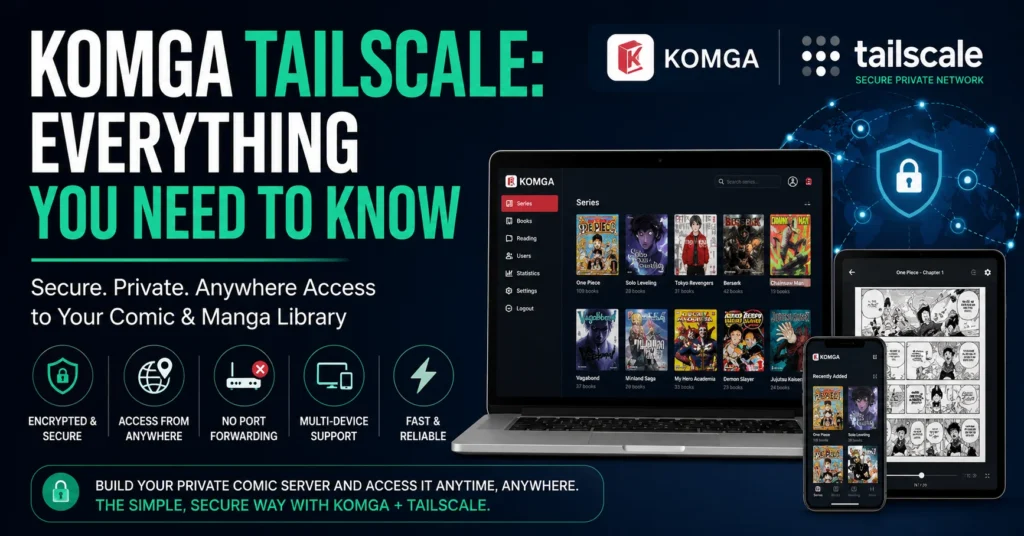
If you love organizing digital comics, manga, graphic novels, or ebooks, you’ve probably heard about Komga. It’s one of the best self-hosted media servers for comic lovers. But what if you want to access your Komga library securely from anywhere without exposing your home network to the internet? That’s where Komga Tailscale becomes an excellent solution.
By combining Komga with Tailscale, you can enjoy remote access to your personal library without dealing with complicated router settings, port forwarding, or expensive cloud hosting. Whether you’re traveling, at work, or simply away from home, your collection remains available through a secure private connection.
This guide explains everything you need to know about Komga Tailscale, including how it works, why people use it, how to set it up, its benefits, common troubleshooting tips, and best practices.
ALSO READ: FAL Rifle Build: Everything You Need To Know
What Is Komga Tailscale?
Komga Tailscale refers to using the Komga media server together with Tailscale’s private networking technology.
Komga is a self-hosted digital library server that allows users to organize, read, and manage comics, manga, and ebooks from almost any device.
Tailscale creates a secure virtual private network (VPN) between your devices using WireGuard technology. Instead of opening ports on your router, every authorized device connects through a secure private network.
Together, they create a safe and convenient way to access your Komga server from anywhere.
Why People Use Komga With Tailscale
Many users prefer this setup because traditional remote access methods can be complicated and sometimes insecure.
Using Komga with Tailscale offers several advantages:
- No port forwarding required
- Secure encrypted connections
- Easy remote access
- Works behind most firewalls
- Supports multiple devices
- Fast setup process
- Private networking
- Reliable performance
This combination is especially useful for home servers.
How Komga Works
Komga scans folders containing comics, manga, or ebooks.
It automatically:
- Detects new books
- Downloads metadata
- Organizes series
- Creates thumbnails
- Tracks reading progress
- Supports multiple users
- Syncs reading history
Users can access their collection through:
- Web browsers
- Mobile browsers
- Tablets
- Desktop computers
- Third-party comic readers
Everything stays organized in one place.
How Tailscale Works
Tailscale builds a private encrypted network between devices.
Every device receives a unique private IP address.
Instead of exposing your server publicly, only devices connected to your private Tailscale network can reach it.
This dramatically improves security while making remote access much easier.
Why Avoid Port Forwarding?
Many beginners struggle with port forwarding because it involves:
- Router configuration
- Firewall rules
- Dynamic IP addresses
- Security risks
- ISP restrictions
With Tailscale, none of this is usually necessary.
Simply install the application, sign in, authorize your devices, and connect.
Requirements Before Setting Up
Before using Komga Tailscale, you’ll typically need:
- A computer or home server
- Komga installed
- Tailscale installed
- Internet connection
- Comic or manga library
- Administrator access
- A supported operating system
Many users install both on:
- Windows
- Linux
- macOS
- Raspberry Pi
- NAS devices
- Docker containers
Installing Komga
Installing Komga is fairly straightforward.
The general process includes:
Download the Server
Choose the version compatible with your operating system.
Install Java (If Required)
Some installations require Java depending on the version you’re using.
Launch Komga
Start the application and access the local web interface.
Add Your Library
Point Komga toward folders containing:
- Manga
- Comics
- Graphic novels
- CBZ files
- CBR files
- EPUB books
- PDF collections
Komga automatically scans and organizes everything.
Installing Tailscale
Setting up Tailscale usually takes only a few minutes.
Typical steps include:
Install the Application
Download Tailscale for your device.
Sign In
Authenticate using your preferred account provider.
Join Your Private Network
After logging in, your device becomes part of your secure network.
Repeat on Other Devices
Install Tailscale on:
- Laptop
- Desktop
- Tablet
- Smartphone
Every authorized device can communicate securely.
Connecting Komga Through Tailscale
After both applications are running:
- Open Komga on your server.
- Check the server’s Tailscale IP address.
- Open a browser on another connected device.
- Enter the private IP followed by Komga’s port.
- Sign into Komga normally.
Your library is now accessible through your encrypted network.
Benefits Of Using Komga Tailscale
Excellent Security
Connections remain encrypted from end to end.
Only authorized devices gain access.
Easy Setup
No complicated networking knowledge is required.
Works Almost Anywhere
Whether you’re at home, traveling, or using public Wi-Fi, your server remains available.
Remote Reading
Continue reading wherever you are.
Reading progress stays synchronized.
Private Access
Your Komga server isn’t publicly visible on the internet.
Cross-Platform Support
Works across numerous operating systems and devices.
Common Use Cases
People use Komga Tailscale in many ways.
Personal Manga Collection
Keep thousands of manga chapters organized.
Comic Library
Store graphic novels in one searchable location.
Family Library
Create multiple user accounts for family members.
Travel Reading
Access your collection during vacations.
Home Server Projects
Many enthusiasts include Komga alongside other self-hosted services.
Performance Expectations
Performance depends on:
- Internet upload speed
- Server hardware
- Network quality
- Device performance
- Storage speed
For most users, page loading feels smooth and responsive.
Large libraries may require additional indexing time during initial setup.
Security Advantages
One major reason people choose Tailscale is security.
Benefits include:
- End-to-end encryption
- Private networking
- Device authentication
- Reduced attack surface
- No exposed ports
- Secure identity management
These features help protect your personal library.
Organizing Your Library
A clean folder structure makes Komga work better.
Example organization:
- Manga
- Series Name
- Volume 1
- Volume 2
- Series Name
- Comics
- Publisher
- Series
- Graphic Novels
- Light Novels
Consistent naming improves automatic metadata detection.
Device Compatibility
Komga works well on many devices.
Popular choices include:
- Windows PCs
- Linux servers
- macOS
- Android phones
- iPhones
- iPads
- Chromebooks
- NAS systems
Tailscale also supports most major platforms.
Tips For Better Performance
Improve your Komga experience by following these suggestions:
- Store books on SSD storage when possible.
- Keep software updated.
- Organize folders consistently.
- Avoid duplicate files.
- Use reliable internet.
- Regularly back up your library.
- Monitor available storage.
- Remove corrupted files.
Common Problems And Solutions
Cannot Reach Komga
Check:
- Tailscale is connected.
- Both devices are online.
- Komga is running.
Library Not Appearing
Verify:
- Folder permissions
- Library path
- Scan status
Slow Loading
Possible causes include:
- Slow upload speed
- Weak Wi-Fi
- Large initial scan
- Limited server resources
Authentication Issues
Ensure:
- You’re signed into the correct Tailscale account.
- Devices are authorized.
- Access permissions are correct.
Best Practices
For a reliable setup:
- Keep Komga updated.
- Update Tailscale regularly.
- Use strong passwords.
- Enable backups.
- Organize files neatly.
- Monitor storage capacity.
- Review connected devices periodically.
These habits help maintain a secure and efficient server.
Who Should Use Komga Tailscale?
This setup is ideal for:
- Manga collectors
- Comic enthusiasts
- Digital library owners
- Home server users
- Privacy-conscious readers
- Self-hosting beginners
- Families sharing a library
If you want secure remote access without complicated networking, Komga with Tailscale is an excellent choice.
Future Of Self-Hosted Reading
Self-hosting continues to grow in popularity as more people value privacy and ownership of their digital collections.
Solutions like Komga paired with secure networking tools make it easier than ever to build a personal library that remains under your control while still being accessible wherever you go.
As internet security becomes increasingly important, private networking solutions are likely to become the preferred way to access home servers remotely.
Conclusion
Komga Tailscale is one of the simplest and safest ways to access your personal comic and manga library from anywhere. Instead of relying on complicated router configurations or exposing your server to the public internet, Tailscale creates a secure private connection that keeps your library protected while remaining easy to use. Whether you’re managing a small manga collection or thousands of digital comics, this combination offers convenience, security, and reliable remote access. With a properly organized library and regular software updates, Komga and Tailscale can provide an outstanding self-hosted reading experience for years to come.
FAQs
What is Komga Tailscale?
Komga Tailscale is the combination of the Komga media server and Tailscale’s secure private networking to safely access your digital comic library remotely.
Do I need port forwarding for Komga Tailscale?
No. Tailscale eliminates the need for traditional port forwarding in most setups.
Is Komga Tailscale secure?
Yes. It uses encrypted private networking, allowing only authorized devices to access your server.
Can I use Komga Tailscale on mobile devices?
Yes. It works with Android, iPhone, tablets, laptops, and desktop computers that have Tailscale installed.
Is Komga Tailscale suitable for beginners?
Yes. It is much easier to configure than traditional remote access methods and is a popular choice for users new to self-hosting.
ALSO READ: College Rejection Simulator Explained For Students

Elara Voss is a technology writer and immersive systems researcher at Argos.Vu, exploring the intersection of AI, virtual reality, and spatial computing. Her work focuses on how emerging technologies reshape the way we perceive, interact with, and understand information in the real world.
She writes about cutting-edge innovations, digital environments, and the future of human–technology interaction—translating complex ideas into engaging, forward-thinking insights.